Go Programming Language — Slices
Go Programming Language — Slices

Slices are a superset of arrays. Like arrays, they hold elements of a single type (declared at definition time). Unlike arrays, their size is dynamic — you do not specify a length at declaration and you can append elements freely.
func main() {
  carArray := [3]string{"BMW", "Ferrari", "Opel"}  // array — fixed size
  carSlice := []string{"BMW", "Ferrari", "Opel"}   // slice — dynamic size
}
You can iterate over a slice with any loop form (for, range, etc.):
for index, carBrand := range carSlice {
  fmt.Println(index, carBrand)
}
Internal Structure
A slice has three internal fields: length, capacity, and a pointer to its backing array. If you were to model it as a struct, it would look something like:
type slice struct {
  Length   int
  Capacity int
  Array    [10]array
}
This is a simplified model, but it captures the essential idea.
Slice capacity grows in powers of two, always large enough to hold the current element count: 0, 1, 2, 4, 8, 16, …
append()
Use the built-in append() function to add elements to a slice. It accepts the target slice as the first argument, followed by one or more elements to add (comma-separated), or a slice spread with ....
When elements are appended:
- If the slice’s current capacity can accommodate them, the elements are placed at the next available index.
- If not, a new backing array is allocated at the next power-of-two capacity that fits, and all elements are copied over.
The len() function returns the current number of elements; cap() returns the current capacity:
package main

import "fmt"

func main() {
  teams := []string{}
  fmt.Println("Initially:")
  fmt.Printf("length: %d, capacity: %d \n", len(teams), cap(teams))

  teams = append(teams, "Besiktas")
  fmt.Println("Added: Besiktas")
  fmt.Printf("length: %d, capacity: %d \n", len(teams), cap(teams))

  teams = append(teams, "Fenerbahce")
  fmt.Println("Added: Fenerbahce")
  fmt.Printf("length: %d, capacity: %d \n", len(teams), cap(teams))

  teams = append(teams, "Galatasaray")
  fmt.Println("Added: Galatasaray")
  fmt.Printf("length: %d, capacity: %d \n", len(teams), cap(teams))

  teams = append(teams, "Trabzon", "Sivas")
  fmt.Println("Added: Trabzon, Sivas")
  fmt.Printf("length: %d, capacity: %d \n", len(teams), cap(teams))

  otherTeams := []string{"Kayseri", "Goztepe", "Malatya", "Manisa"}
  teams = append(teams, otherTeams...)
  fmt.Println("Added: Kayseri, Goztepe, Malatya, Manisa")
  fmt.Printf("length: %d, capacity: %d \n", len(teams), cap(teams))
}
Output:
Initially:
length: 0, capacity: 0
Added: Besiktas
length: 1, capacity: 1
Added: Fenerbahce
length: 2, capacity: 2
Added: Galatasaray
length: 3, capacity: 4
Added: Trabzon, Sivas
length: 5, capacity: 8
Added: Kayseri, Goztepe, Malatya, Manisa
length: 9, capacity: 16
make()
You can also create a slice using make(). It takes the element type, length, and an optional capacity:
package main

import "fmt"

func main() {
  intSlice := make([]int, 2)
  fmt.Printf("%v, length: %d, capacity: %d \n", intSlice, len(intSlice), cap(intSlice))

  stringSlice := make([]string, 3, 4)
  fmt.Printf("%q, length: %d, capacity: %d \n", stringSlice, len(stringSlice), cap(stringSlice))
  stringSlice[0] = "Skoda"
  stringSlice = append(stringSlice, "BMW", "Ferrari")
  fmt.Printf("%q, length: %d, capacity: %d \n", stringSlice, len(stringSlice), cap(stringSlice))
}
Output:
[0 0], length: 2, capacity: 2
["" "" ""], length: 3, capacity: 4
["Skoda" "" "" "BMW" "Ferrari"], length: 5, capacity: 8
After make(), unassigned elements hold the zero value for the element type (0, "", or false).
2D Slices
Just as Go supports 2D arrays, it supports 2D slices. A 2D slice is a slice of slices — each inner slice can have its own length and capacity:
package main

import "fmt"

func main() {
  _2DStringSlice := [][]string{{"one", "two", "three"}, {"a", "b"}}
  fmt.Printf("%q \n", _2DStringSlice)
  _2DStringSlice[0][2] = "four"
  _2DStringSlice[1][0] = "x"
  fmt.Printf("%q \n", _2DStringSlice)

  type _2DIntSlice [][]int
  notes := _2DIntSlice{[]int{1, 2, 3}, []int{4, 6}}
  fmt.Printf("%v \n", notes)
  fmt.Println(notes[0][1])
}
Output:
[["one" "two" "three"] ["a" "b"]]
[["one" "two" "four"] ["x" "b"]]
[[1 2 3] [4 6]]
2
Sub-slicing
You can create a new slice from a portion of an existing one using the [start:end) syntax (start inclusive, end exclusive):
package main

import "fmt"

func main() {
  cars := []string{"BMW", "Ferrari", "Opel", "Skoda"}
  fmt.Println(cars)
  subsetOfCars := cars[1:3]
  fmt.Println(subsetOfCars)

  fmt.Println("Changing the first element of the sub-slice to \"Honda\"")
  subsetOfCars[0] = "Honda"
  fmt.Println(subsetOfCars)
  fmt.Println("The original cars slice is also affected:")
  fmt.Println(cars)
}
Output:
[BMW Ferrari Opel Skoda]
[Ferrari Opel]
Changing the first element of the sub-slice to "Honda"
[Honda Opel]
The original cars slice is also affected:
[BMW Honda Opel Skoda]
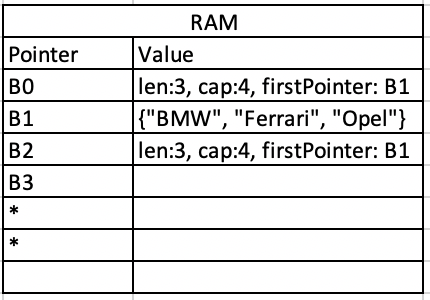
The sub-slice references the same backing array as the original — this is because slices are passed by reference.
Pass by Value vs. Pass by Reference
In Go:
- Pass by value:
int,float,string,bool,structs— a copy is made when passed to a function. - Pass by reference:
slices,maps,channels,pointers,functions— the reference is shared.
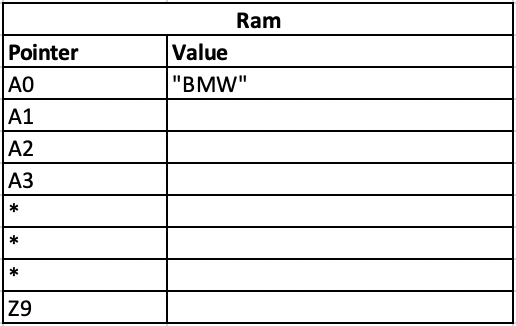
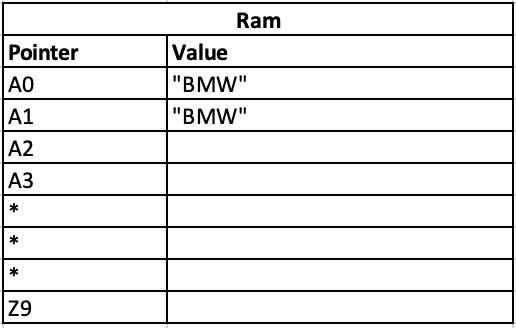
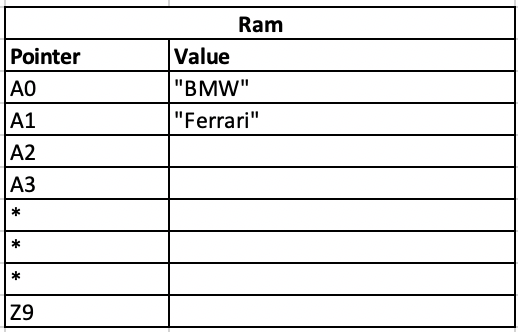
When you pass a string to a function and modify it inside, the original is unchanged. When you pass a slice and modify an element, the original slice reflects the change:
package main

import "fmt"

func main() {
  car := "BMW"
  fmt.Println("car before:")
  fmt.Println(car)
  changeCarString(car)
  fmt.Println("car after changeCarString:")
  fmt.Println(car)

  fmt.Println("/////////////////")

  cars := []string{"BMW", "Ferrari", "Opel"}
  fmt.Println("cars before:")
  fmt.Println(cars)
  changeCarsSlice(cars)
  fmt.Println("cars after changeCarsSlice:")
  fmt.Println(cars)
}

func changeCarString(car string) {
  car = "Ferrari"
  fmt.Println("inside changeCarString:")
  fmt.Println(car)
}

func changeCarsSlice(cars []string) {
  cars[0] = "Skoda"
  fmt.Println("inside changeCarsSlice:")
  fmt.Println(cars)
}
Output:
car before:
BMW
inside changeCarString:
Ferrari
car after changeCarString:
BMW
/////////////////
cars before:
[BMW Ferrari Opel]
inside changeCarsSlice:
[Skoda Ferrari Opel]
cars after changeCarsSlice:
[Skoda Ferrari Opel]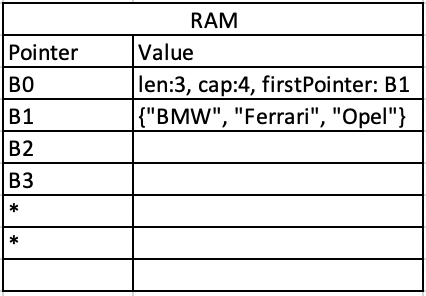
copy()
If you want a new slice with the same values but no shared backing array, use copy(). It takes two parameters: the destination slice and the source slice:
package main

import "fmt"

func main() {
  cars := []string{"BMW", "Ferrari", "Opel", "Skoda"}
  fmt.Println("Before copy:")
  fmt.Printf("cars: %q \n", cars)
  copyCars := make([]string, len(cars))
  copy(copyCars, cars)
  copyCars[0] = "Bugatti"
  copyCars = append(copyCars, "Ford")
  fmt.Println("After copy:")
  fmt.Printf("cars: %q \n", cars)
  fmt.Printf("copyCars: %q \n", copyCars)
}
Output:
Before copy:
cars: ["BMW" "Ferrari" "Opel" "Skoda"]
After copy:
cars: ["BMW" "Ferrari" "Opel" "Skoda"]
copyCars: ["Bugatti" "Ferrari" "Opel" "Skoda" "Ford"]